Microsoft Is Retiring Its Admin-Managed Calendar Sync for Teams and Google Workspace: What to Do Now
Microsoft is ending calendar synchronization between Google Workspace and Microsoft Teams in October 2026. Organizations that rely on both systems will need to consider how to keep their calendars in sync going forward.
Syncory makes it easy to synchronize calendars across major calendar providers, allowing users to continue working with their existing calendar systems without having to move their entire organization to a single platform.
In this article, we explain what Microsoft's decision means, which features will remain available, and how you can keep your calendars in sync with Syncory.
What Is Microsoft Discontinuing?
Microsoft is discontinuing its calendar synchronization integration between Google Workspace and Microsoft Teams in October 2026. The feature allowed administrators to configure calendar synchronization through the Admin app in Teams by setting up their organization's domain and matching Google Workspace accounts with Teams accounts.
After the integration is discontinued, existing synchronizations will stop, and administrators will no longer be able to manage the setup through the Teams Admin app. Organizations should identify affected calendars and save any relevant account-matching information beforehand.
What Is Not Affected by This Change?
To avoid confusion, Microsoft is not discontinuing the ability to schedule Microsoft Teams meetings through Google Calendar. The Teams Meeting add-on will remain available, allowing users to create and manage Teams meetings directly from Google Calendar.
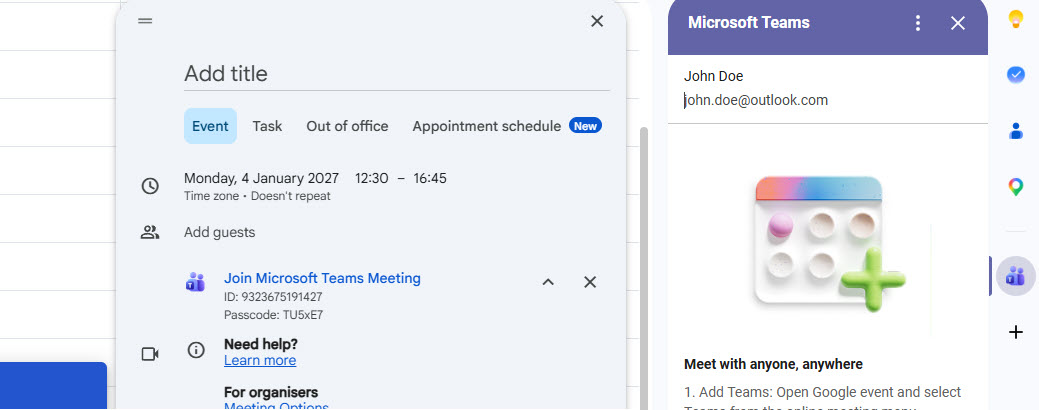
Users can continue using the add-on to schedule meetings and join Teams calls without leaving Google Calendar.
The Teams Meeting Add-on Is Not a Replacement for Calendar Synchronization
The Teams Meeting add-on allows users to create Teams meetings directly from Google Calendar, invite participants, and join video conferences. However, meetings created through the add-on appear in Google Calendar and are not automatically synchronized with the user's Outlook calendar.
If you only need to schedule Teams meetings through Google Calendar, the add-on may be sufficient. However, if your organization needs to keep Google Workspace and Microsoft 365 calendars synchronized, a separate solution is required.
Why Calendar Synchronization Matters for Organizations
Many organizations use multiple calendar systems at the same time. This can happen following acquisitions, across subsidiaries, when working with external service providers, or simply because different teams use different IT systems.
While some employees use Microsoft 365 with Outlook and Teams, others rely on Google Workspace and Google Calendar.
Without calendar synchronization, problems can arise quickly.
For example, an employee schedules a client meeting in Google Calendar. The event does not appear in their Outlook calendar. Colleagues checking the employee's availability through Microsoft 365 may see an open time slot, even though the employee is already booked.
This can lead to double bookings, incomplete availability information, additional coordination between teams, and the manual transfer of events between calendars.
Automatic calendar synchronization helps prevent these issues by keeping events aligned across calendar systems without requiring users to update each calendar manually.
How to Keep Google Calendar and Outlook in Sync with Syncory
Syncory connects calendars across major calendar providers and lets you choose which calendars you want to synchronize. You can then create individual synchronization rules to determine how events are transferred between them.
These rules can also help you protect sensitive calendar information. For example, if colleagues only need to know when you are busy, you can configure a synchronization rule to hide event details such as titles and descriptions in the destination calendar. The appointment still blocks the corresponding time slot, but its contents remain hidden.
This is useful when synchronizing calendars across teams or organizations that need to coordinate availability without sharing confidential meeting information. Instead of making every appointment visible in full, you can adapt the synchronization to what the other calendar actually needs to show.
With Syncory, organizations can continue using their existing calendar systems while keeping schedules aligned across different accounts and providers.
Conclusion: Keep Google Calendar and Outlook in Sync
Microsoft's decision to discontinue the existing integration is a good opportunity to review your organization's calendar setup. When employees continue to use different calendar systems, reliable synchronization remains important.
With Syncory, you can connect calendars across major providers, configure individual synchronization rules, and keep events aligned automatically without requiring everyone to switch to the same system.